U3b · September 2026 · Users
Guided tutorials
Follow complete workflows, with illustrated checkpoints and expected results.
Before you start
Use an authorized account and the Thurston pilot project for these walkthroughs. Do not request elevated access merely to reproduce an illustration. An owner can author the pilot annex; viewers can explore the evidence allowed by their membership.
The screenshots show the actual built interface running in an isolated browser harness with explicitly synthetic data. They explain controls and layout, not current conditions, measured findings or production account state. Values in your project may differ.
Interactive introduction for prospective users
Open /demo.html for an approximately five-minute public preview. No account is needed. The example geography, indicator values, providers and planning note are fictional and labeled throughout; they are not Thurston findings or live assessment evidence.
The eight chapters introduce the planning question, mapped indicators, source interpretation, clinic layers, cross-source comparison, planning workflows, outputs and next steps. The preview requests no workspace records and does not create decisions or export jobs.
Evidence categories start collapsed. Expand a category to see its measures; searches reveal matching categories. Dataset/source labels are shown with the selected measure in the information panel instead of repeating in the list. In the live Explorer, select Take a tour. The guide appears in a floating instruction card beside the current feature. A gold outline and connecting arrow identify the relevant map or controls. Follow the bold instruction or use the prominent action button; expand Why this matters for context. The card follows scrolling and resizing, and can be closed or restarted. Its Show actions use the selected county and available evidence; unavailable layers produce an explanation. Normal workspace membership and permissions continue to apply.
Both tours include surrounding-county comparison and a two-measure overlap demonstration. The live steps use actual admitted county data: compare the mapped indicator across borders, then return to the selected county and combine diabetes and households without a vehicle at the top-20% threshold. Loading, permission limits, missing values and method guards remain visible; at least two measures must be assessed before the overlap step completes. The public preview uses fictional county estimates and explicitly simplified fixed cutoffs, not live results. Both tours advance automatically after the current action completes, with a brief completion message. The public preview advances on tract selection, an indicator change, a clinic selection, opening the candidate comparison, choosing a workflow and downloading the sample note. The live guide also responds to normal Explorer actions and waits for both clinic sources to finish loading. Missing access or failed loading does not count as completion; Back, Skip this step and Close remain available.
- Share the public /demo.html link using Copy demo link. A link grants access to the fictional preview only.
- Complete the action shown in each chapter; the next chapter opens automatically. Select a tract, change the indicator, select another tract and then a clinic. Open the candidate comparison and choose a planning workflow. Back and Skip this step are optional controls, not required to finish. Keyboard users can use the tract buttons or focus map shapes and press Enter.
- Open the Outputs chapter to download an illustrative planning note. It is explicitly not a live report or assessment.
- For a live presentation, sign in from the preview or open /explorer?county=53067&step=explore&tour=intro. Access to actual Thurston evidence depends on the account; this link does not grant workspace access.
- Use the live guide’s action button or the normal Explorer controls. Successful actions advance automatically; clinic steps wait for loaded sources. Unavailable features explain what is missing and can be skipped. Close tour or press Escape to stop. Closing, restarting, going back or skipping cancels any queued advance. No tour action submits reviews, decisions or live report exports.
- For a tailored discussion, ask the prospect for their county, planning question, intended decision and reviewers. Use real local evidence and stakeholder input before treating an observation as a recommendation.
Tutorial 1 · Explore a county and a tract
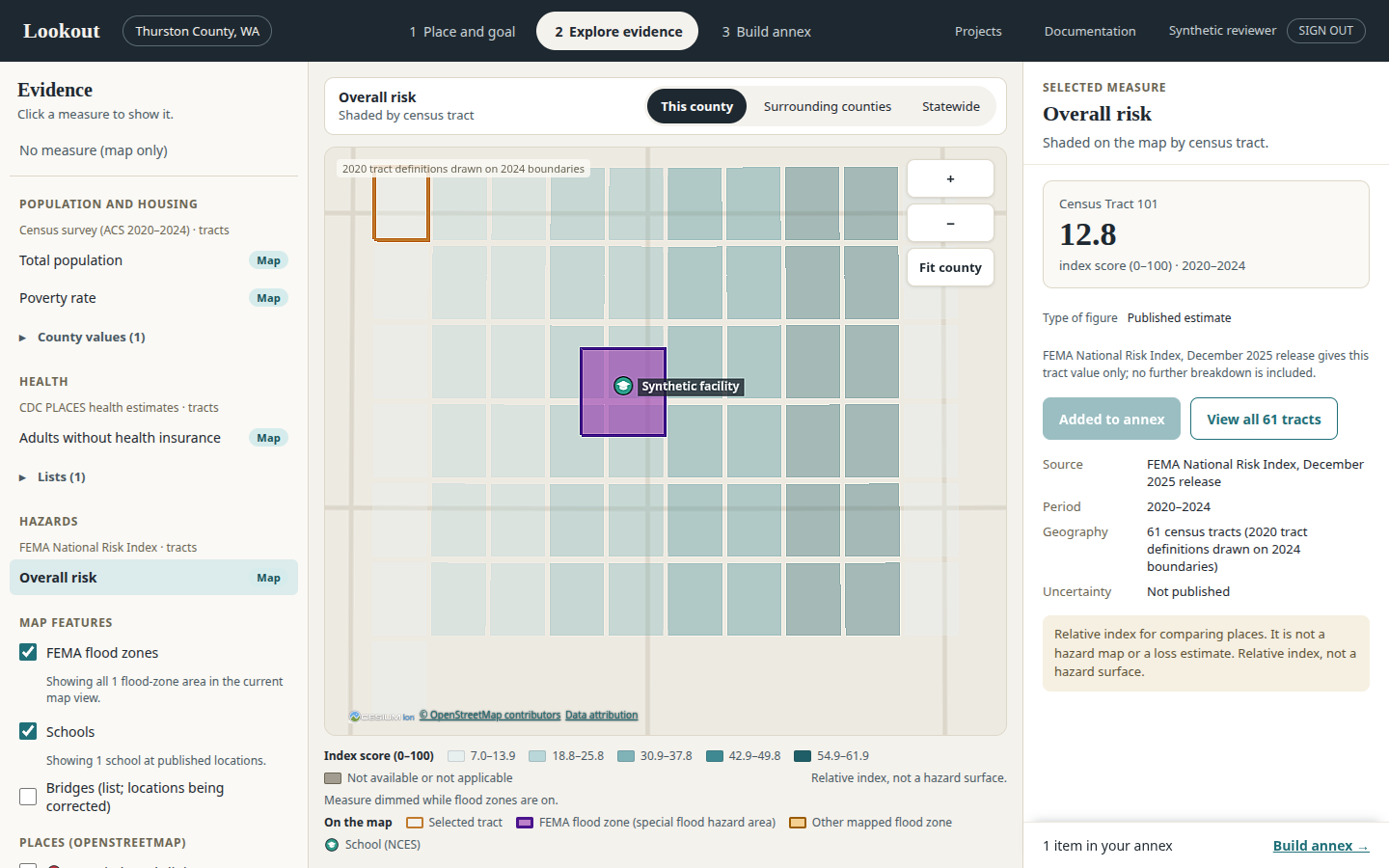
- Open Lookout and confirm that you are signed in. On Place and goal, choose Washington and search for Thurston County. Select the Washington result, not the similarly named Nebraska county.
- Choose the hazard-mitigation goal. The full pilot view opens for Thurston when your account is a project member. If only standard evidence is available, stop and confirm access with the administrator.
- In Explore evidence, select a measure marked Map. Read the source period and unit before using the map colors. The map shows the chosen measure; outlines and contextual layers are separate.
- Select a tract. Read its value, source, reliability and missing-data labels in the details or tract profile. For U4 health measures, review the model-based estimate and interval, not only the color.
- Change to Surrounding counties, then return to This county. Read the updated legend and reference set. Comparing different views can change local rankings even though an underlying published value is unchanged.
Tutorial 2 · Inspect overlap without creating an annex claim
- Select a Washington county with available evidence and open the overlap view. For M1 measures, use one of the five admitted counties.
- Choose up to five available measures, such as a health measure and households without a vehicle. Read their universes: an adult prevalence rate and a household share do not measure the same population.
- Review each direction of concern and the threshold controls. A measure that asks you to choose a direction cannot count until you choose one. County-only resilience cannot be an overlap input.
- Inspect the counted/excluded measures, missing-data denominator and method panel. A count of 2 among 3 assessable measures is different from 2 among 5.
- Inspect a tract with a high count and a tract marked not assessable. Review the underlying cells and source notes rather than interpreting either as a diagnosis or forecast.
- Copy the view link and share it only through an approved channel. The link carries a configuration, not an access grant or a frozen dataset snapshot. Recipients need their own access.
Tutorial 3 · Build a cited pilot annex
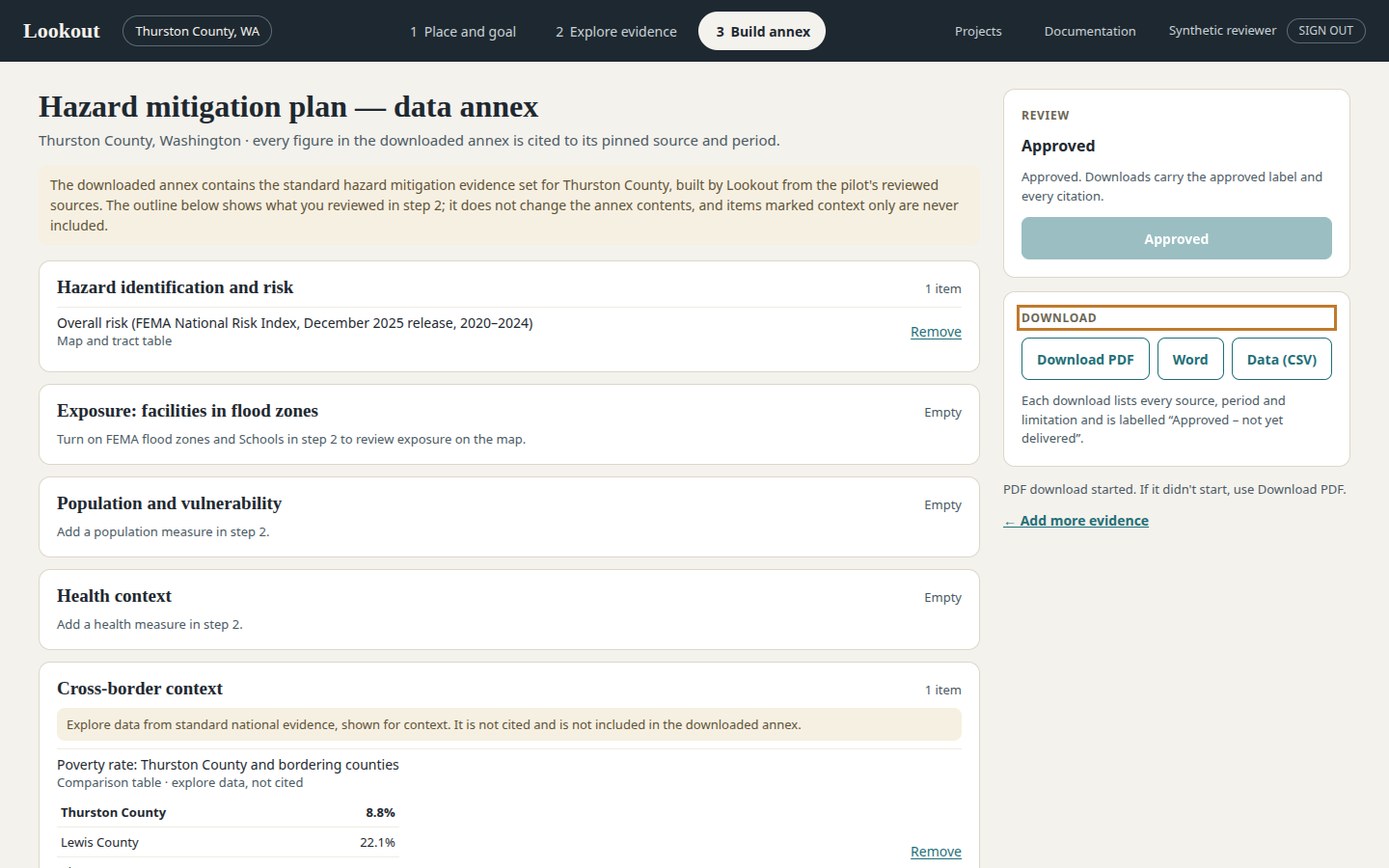
- Sign in with authoring access to the Thurston pilot. Add eligible existing evidence in Explore evidence. On Build annex, select up to five additional measures if U3b annex permissions are enabled; optionally include the Thurston-only overlap and storm-history section.
- Open Build annex and inspect the outline. Check the evidence categories, citations and gaps. Remove or revisit items that do not support your planning question.
- Prepare the cited draft using the offered control. Wait for its run to finish; a draft is not an approved final document.
- Follow the visible review and snapshot workflow allowed by your account. If a required action is unavailable, ask an authorized reviewer or owner. Do not use a different account to evade a review restriction.
- Choose PDF, Word or Data (CSV). If generation is still pending, wait and use the visible Download link once ready. A delayed browser download may require another click.
- Open the downloaded file and check that it contains the expected evidence, citations and source periods. Retain the run/snapshot identifiers with the working record.
Tutorial 4 · Review as a viewer
- Sign in as a member with viewer permissions and open the project through your own session.
- Read the same county and tract evidence permitted to that project. Confirm that owner-only bridge details are absent; this is expected.
- Inspect existing artifacts only when your role and current source permissions allow it. Do not assume a visible export button grants permission to create a new export.
- Report questions using the county, measure/layer, project identifier and displayed request ID. Describe a coverage or access issue without copying private records into a ticket.
Completion checklist
- I can select the correct county and distinguish pilot evidence from standard evidence.
- I can explain a value’s geography, unit, period, uncertainty and source.
- I can distinguish unavailable data from zero and a local overlap count from a publisher score.
- I can identify which evidence is eligible for the annex and verify a downloaded document.
- I know how to report an issue without sending credentials or private evidence.
Implementation references for this manual
Repository paths reviewed for this U3b documentation. Optional code is not a claim of live availability.
src/lookout/flow/guidedFlow.jssrc/lookout/flow/annexStep.jstests/lookout/product/ux/P9-guided-flow.browser-runtime.test.mjs